Arduboy Course - Part III: Animated Sprites
Previous Chapter: Part II: MOVEMENT
Create a Sprite animation in Aseprite

-
Open Aseprite, click
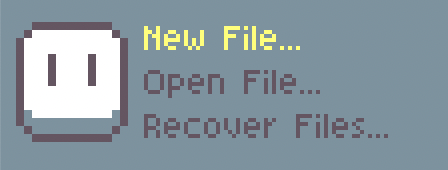
New File...in the top left and enter the dimensions you want your Sprite to have.-
Enter a Width of 8px and a Height of 8px. (For use on an Arduboy the dimensions must be multiples of 8!)
-
Choose Indexed as your color mode
-
Choose Black as your Background.
-
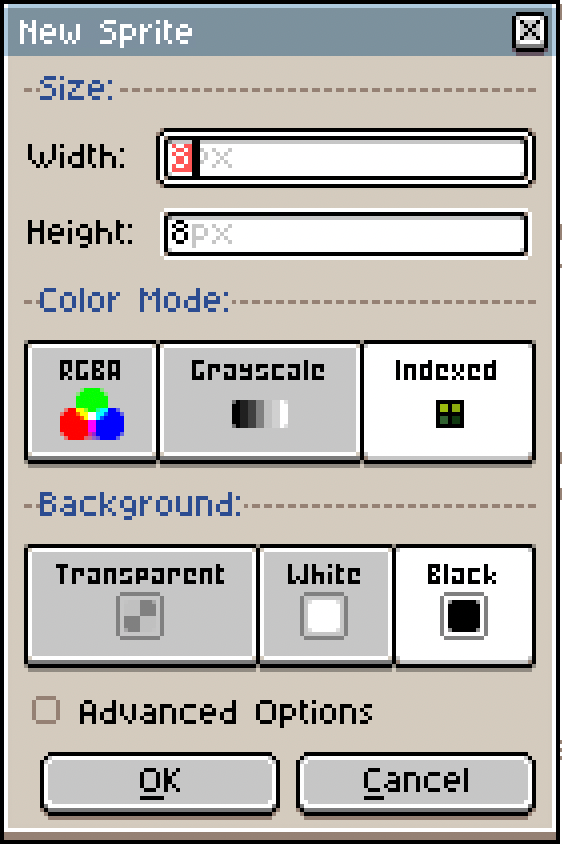
-
Now you see an empty document. Select all colours in the palette on the left side except for black and white and delete them (you can drag-select). The Arduboy’s display can only handle black and white, so no use keeping any other colours around…
-
Select white and use the pencil tool (
B) to draw your first frame. (PressXto swap between black and white)
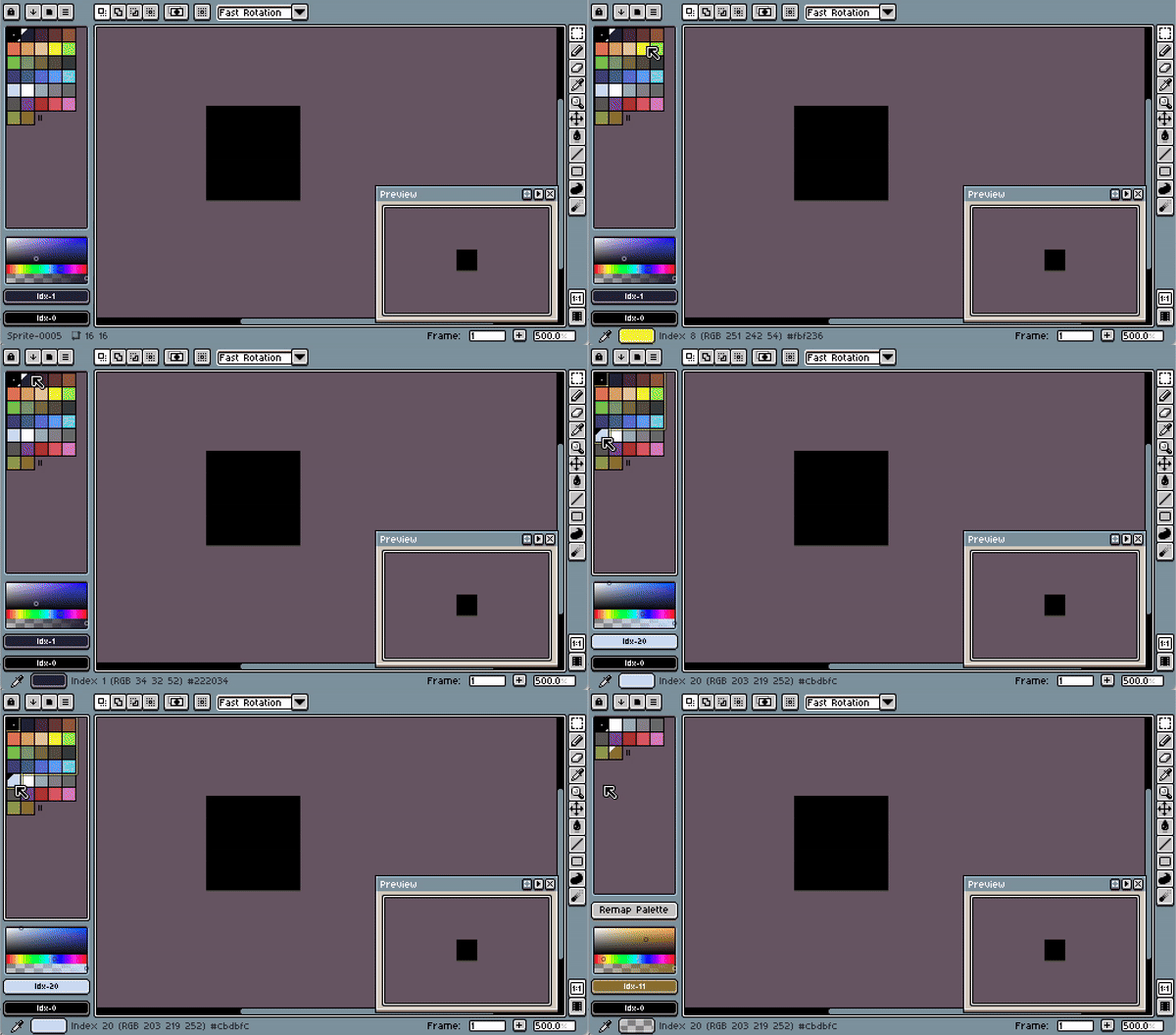
-
Then open the timeline by pressing the 🎞️ button on the bottom right
-
Select
Frame>Duplicate Cel(s)(ALT+D) to create a second frame and change it to start a little animation. You can pressEnterto toggle playback. -
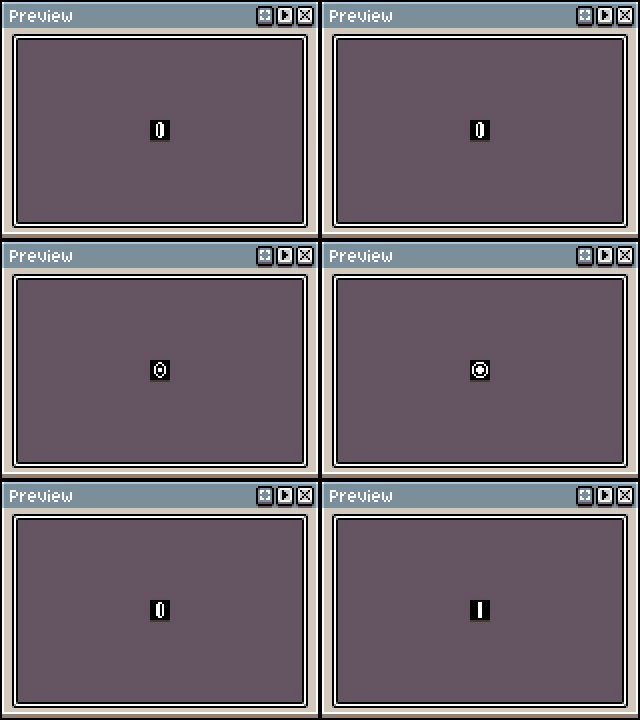
Add a few more frames until you have a little animation.
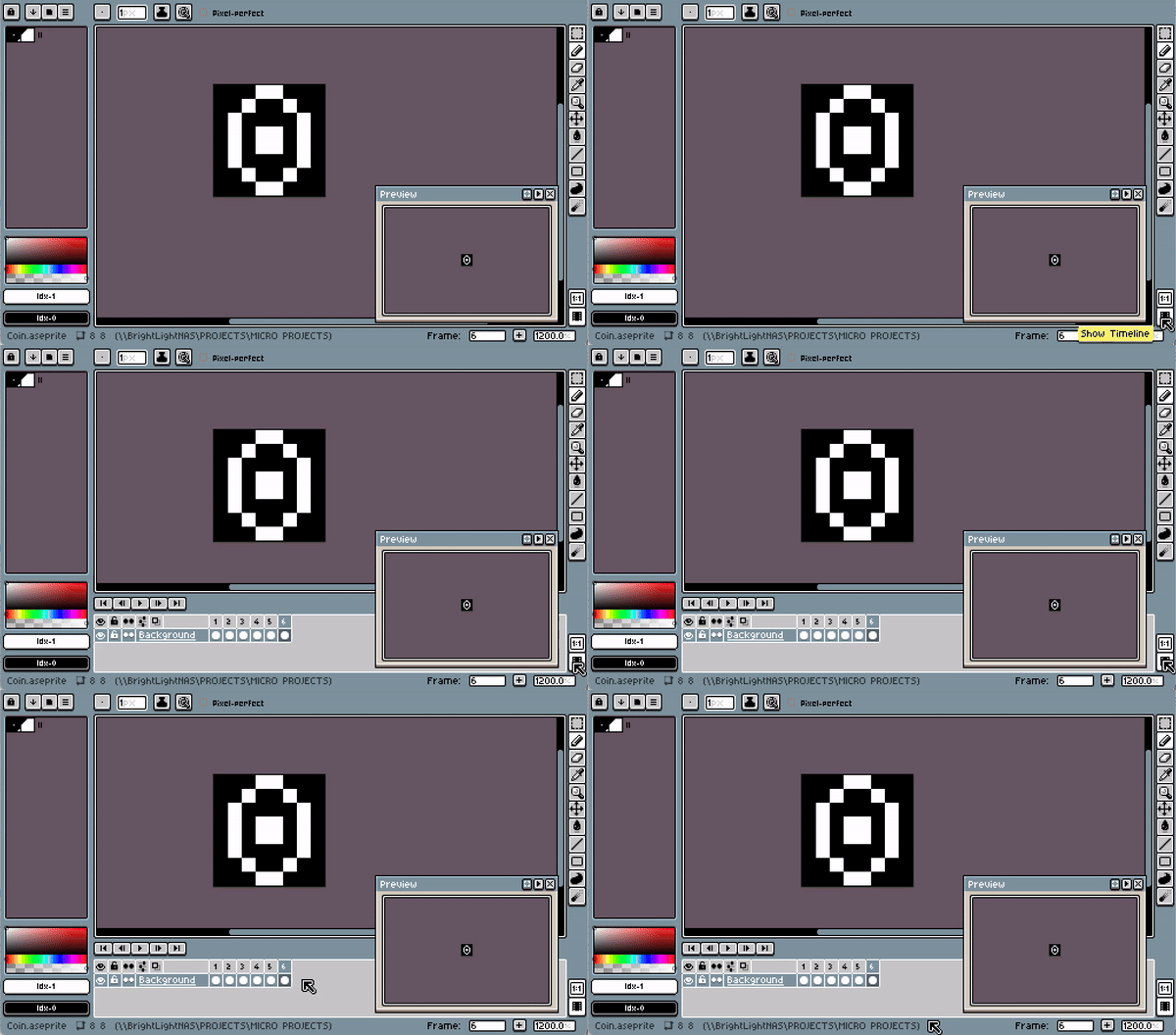
Export from Aseprite
-
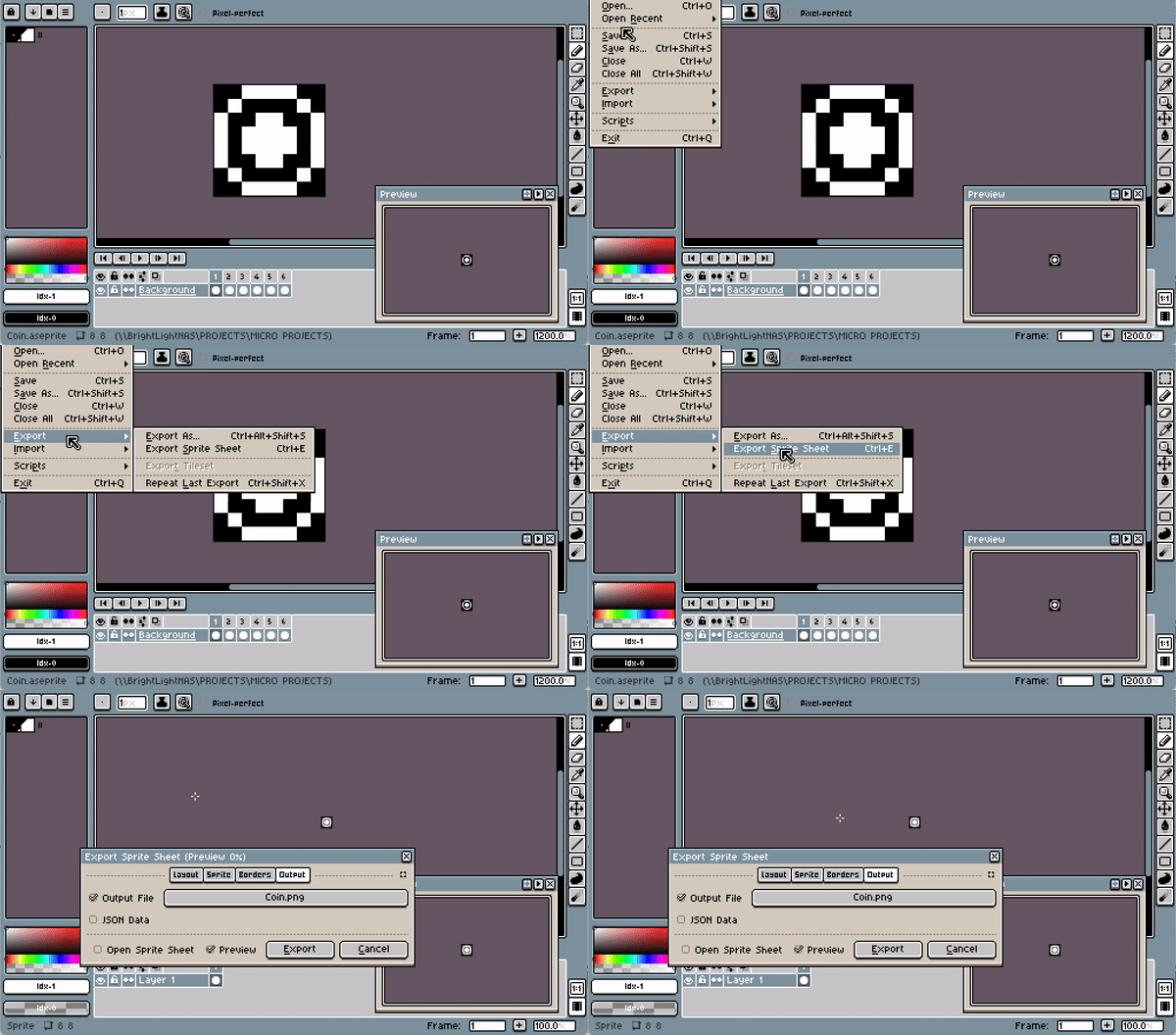
Select
File>Export>Export Sprite Sheet(CTRL+E)-
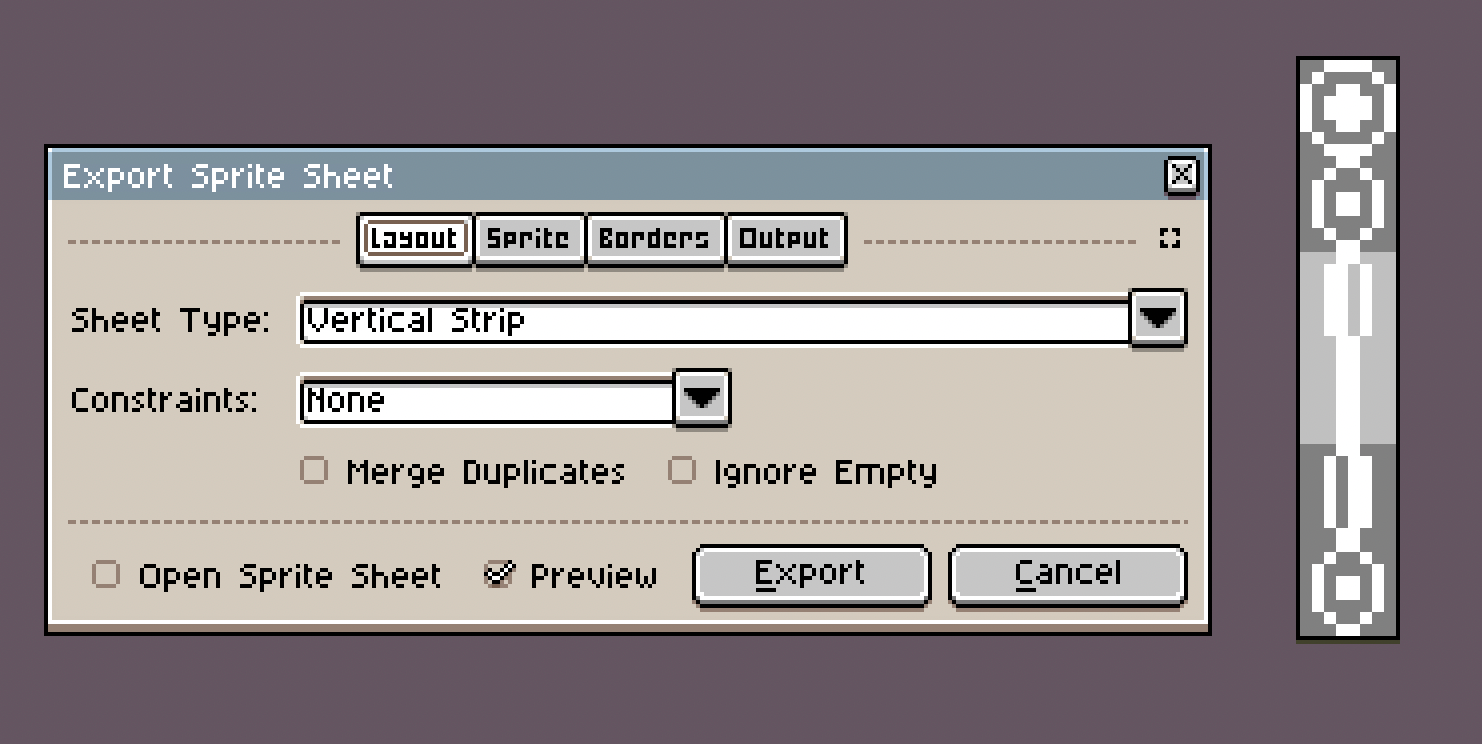
Under Layout, choose Sheet Type: Vertical Strip - this is the required format for Arduboy
-
Under Output, select PNG and choose a name and location for your file.
-
Click
Export
-
Convert PNG to Byte Array
-
Go to 🌐 https://www.bloggingadeadhorse.com/TeamARGImgConverter/
-
Drag your exported file onto the drop zone
-
Copy the output.
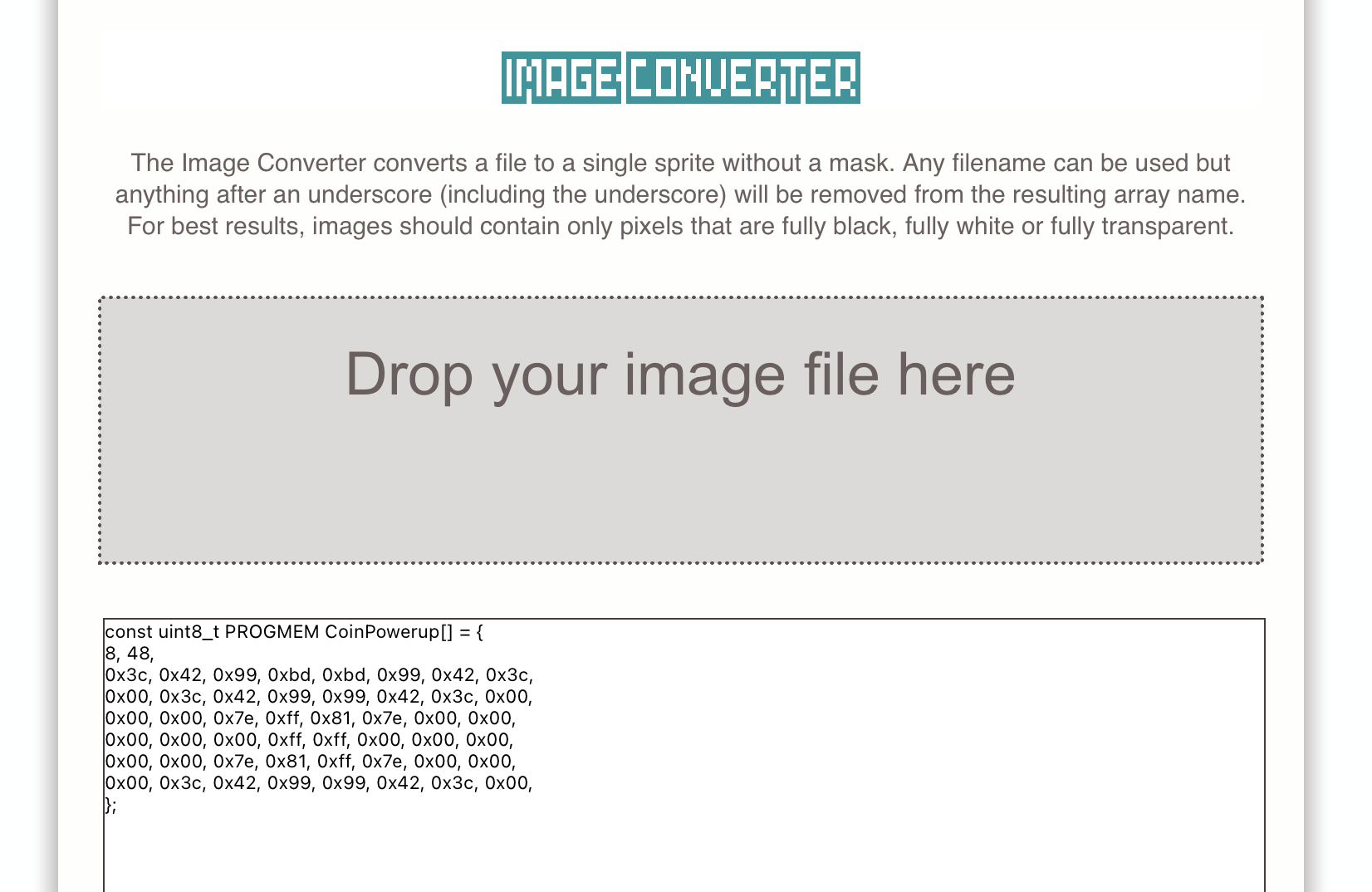
// The data for my little coin animation:
const uint8_t PROGMEM CoinPowerup[] = {
8, 48,
0x3c, 0x42, 0x99, 0xbd, 0xbd, 0x99, 0x42, 0x3c,
0x00, 0x3c, 0x42, 0x99, 0x99, 0x42, 0x3c, 0x00,
0x00, 0x00, 0x7e, 0xff, 0x81, 0x7e, 0x00, 0x00,
0x00, 0x00, 0x00, 0xff, 0xff, 0x00, 0x00, 0x00,
0x00, 0x00, 0x7e, 0x81, 0xff, 0x7e, 0x00, 0x00,
0x00, 0x3c, 0x42, 0x99, 0x99, 0x42, 0x3c, 0x00,
};
Displaying sprites on the Arduboy
- Paste the byte array into your project!

Per default the output starts with the size of the entire image. ‼️ Change the second number to the height of just *one *frame! ‼️ (In the coin example I have 48 as the height, but it’s actually 6 frames on top of each other, so I have to change the height to 8)
- Now we can draw the image with the Sprites class!
// Draw frame #4 (zero-based index 3) of the "CoinPowerup" image at position x:20, y:28
Sprites::drawOverwrite(20, 28, CoinPowerup, 3);
Here is the full code for an example where you see the animated CoinPowerup:
#include <Arduino.h>
#include <Arduboy2.h>

Arduboy2 arduboy;

const uint8_t PROGMEM CoinPowerup[] = {
8, 8,
0x3c, 0x42, 0x99, 0xbd, 0xbd, 0x99, 0x42, 0x3c,
0x00, 0x3c, 0x42, 0x99, 0x99, 0x42, 0x3c, 0x00,
0x00, 0x00, 0x7e, 0xff, 0x81, 0x7e, 0x00, 0x00,
0x00, 0x00, 0x00, 0xff, 0xff, 0x00, 0x00, 0x00,
0x00, 0x00, 0x7e, 0x81, 0xff, 0x7e, 0x00, 0x00,
0x00, 0x3c, 0x42, 0x99, 0x99, 0x42, 0x3c, 0x00,
};

void setup() {
  arduboy.begin();
}

uint8_t count = 0;
uint8_t currentFrame = 0;

void loop() {
  if(!arduboy.nextFrame()) return;

  arduboy.clear();
  arduboy.pollButtons();

  Sprites::drawOverwrite(20, 20, CoinPowerup, currentFrame);

  count++;
  if(count >= 10) { // after 10 frames, go to the next frame of the animation
    count = 0;
    currentFrame++;
    if(currentFrame > 5) {
      currentFrame = 0;
    }
  }

  arduboy.display();
}
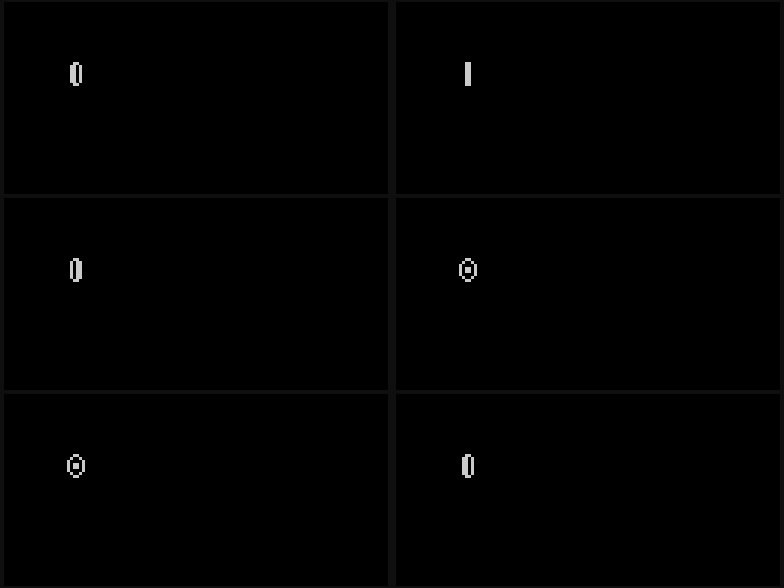

Alright, It plays the animation! But the code is NOT very flexible and NOT easily re-usable, so let’s fix that next!
AnimationPlayer Class

Let’s make a class that makes playing Animations simple for us! We’ll put that class into a new file.
-
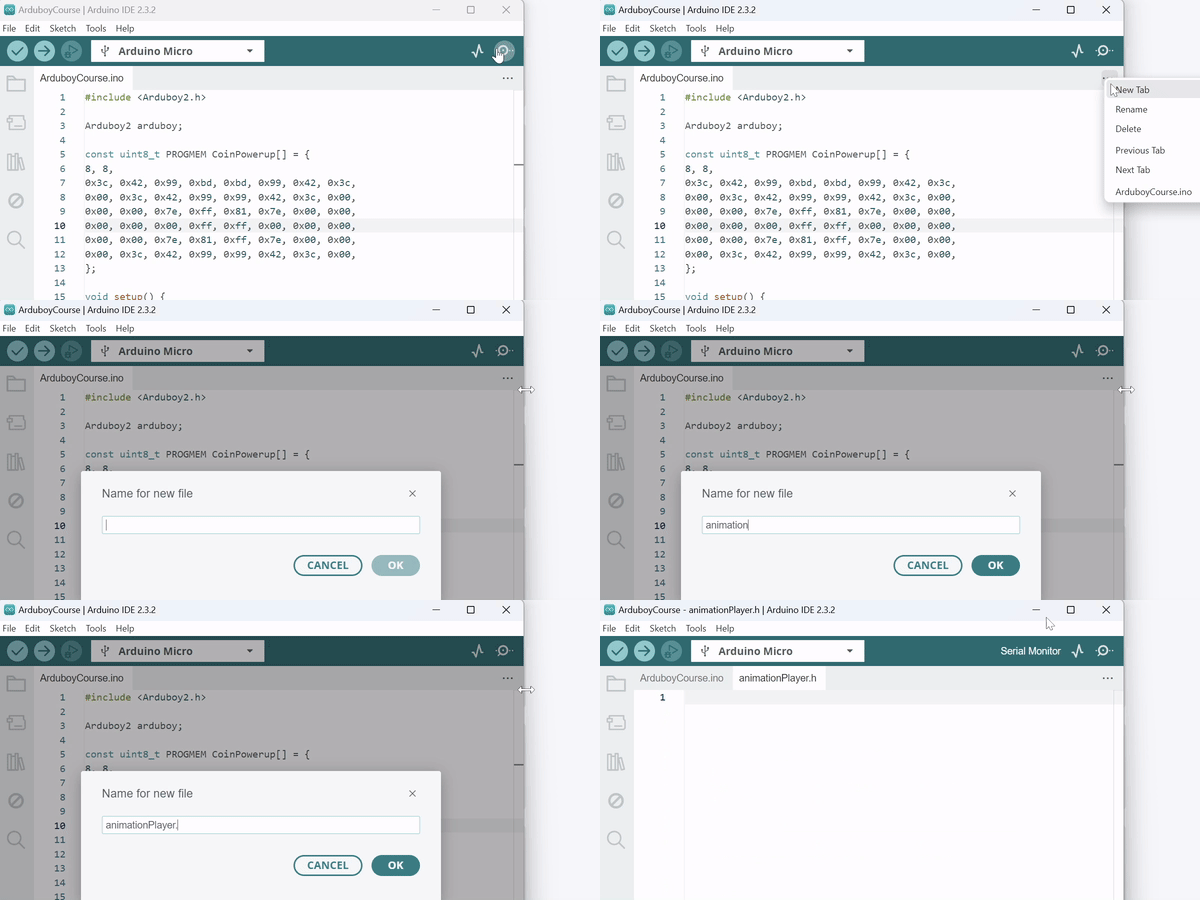
In the Arduino IDE click onto the 3 dots (
…) at the top right of the source code, then chooseNew Tab -
This will create a new file, name it
animationPlayer.h
In C++ you usually split your code into: → header files (.h) that contain variable and function definitions → source files (.cpp) that contain the actual implementations But we’re not going to do that. For simplicity’s sake, we’re just going to put everything into the header file and be done with it. 👍
👉 This is the plan:
-
Set up the new file
-
We’ll create the struct
**Animation**** **that holds all the information about one single animation - the byte array, the number of frames it has, and an array that determines how long each frame should be shown for (in milliseconds). -
Then we’ll create a class
AnimationPlayerthat can hold multipleAnimationstructs. Then we can easily switch between which of its Animations should be playing!
1. Basic File Setup: Include-Guard
We start out by adding a so-called **“Include-guard”.
**This is to make sure that the same code won’t get included multiple times, even if we do #include ‘animationPlayer.h’ in multiple places.
#ifndef ANIMATION_PLAYER_H // if ANIMATION_PLAYER_H is not defined yet...
#define ANIMATION_PLAYER_H // ...define it. (next time it will already be there and it will skip everything)

// ACTUAL CODE WILL GO HERE

#endif //ANIMATION_PLAYER_H // ... end of the if statement
2. Animation Struct
Now we create the Animation struct (In C++ a struct is basically the same as a class: a custom data type that can hold multiple variables and methods.)
struct Animation {
    const uint8_t* spriteArray; // byte data array of the Animation
    uint8_t totalFrames; // how many frames are in this Animation?
    const int* frameTimes; // Array of frame times (in ms)
};
3. AnimationPlayer Class
We want the AnimationPlayer class to do the following for us:
-
Hold data for multiple individual animations - this will allow us to have all the animations for a character or prop in one
AnimationPlayerinstance! -
Draw the current frame of the current animation onto the screen
-
Automatically advance frames according to the
frameTimesArray of eachAnimation -
Automatically loop at the end
Here it is:
#ifndef ANIMATION_PLAYER_H // Include-guard (to make sure the same stuff can't get included multiple times)
#define ANIMATION_PLAYER_H

#include <Arduboy2.h>

struct Animation {
    const uint8_t* spriteArray; // byte data of this Animation
    uint8_t totalFrames; // how many frames are in this Animation?
    const int* frameTimes; // Array of frame times (in ms)
};

class AnimationPlayer {
		private: // means it can only be accessed from within the class
		    Animation animations[8]; // Array of Animation struct instances - I set it to 8 max
		    uint8_t currentAnimationIndex; // Index of the currently playing Animation
		    uint8_t currentFrame; // The current frame inside the current Animation
		    unsigned long lastFrameChangeTime; // When was the last frame?
		    unsigned long frameDuration; // Duration of the current frame in milliseconds
		public: // means it can be accessed from outside the class
		    AnimationPlayer() : currentAnimationIndex(0), currentFrame(0), lastFrameChangeTime(0), frameDuration(0) {}

		    void addAnimation(uint8_t index, const Animation animation) { // SETUP - add an Animation to this object
		        if (index < 8) {
		            animations[index] = animation;
		        }
		    }

		    void playAnimation(uint8_t index) { // Set it to play the animation at the given index
		        if (index < 8) {
		            currentAnimationIndex = index;
		            currentFrame = 0;
		            lastFrameChangeTime = millis();
		            frameDuration = animations[currentAnimationIndex].frameTimes[0];
		        }
		    }

		    void update() { // method for calculating when it's time to display the next frame
		        unsigned long currentTime = millis();
		        if (currentTime - lastFrameChangeTime >= frameDuration) {
		            currentFrame = (currentFrame + 1) % animations[currentAnimationIndex].totalFrames;
		            lastFrameChangeTime = currentTime;
		            frameDuration = animations[currentAnimationIndex].frameTimes[currentFrame];
		        }
		    }

		    void draw(int16_t x, int16_t y) { // draw the current frame of the Animation!
		        update(); // calls update, so you don't have to
		        Sprites::drawSelfMasked(x, y, animations[currentAnimationIndex].spriteArray, currentFrame);
		    }
};

#endif //ANIMATION_PLAYER_H
And here is how to use it:
#include <Arduboy2.h>
#include "animationPlayer.h" // Include the new file!

Arduboy2 arduboy;

// Coin Animation data
const uint8_t PROGMEM CoinPowerup[] = {
8, 8,
0x3c, 0x42, 0x99, 0xbd, 0xbd, 0x99, 0x42, 0x3c,
0x00, 0x3c, 0x42, 0x99, 0x99, 0x42, 0x3c, 0x00,
0x00, 0x00, 0x7e, 0xff, 0x81, 0x7e, 0x00, 0x00,
0x00, 0x00, 0x00, 0xff, 0xff, 0x00, 0x00, 0x00,
0x00, 0x00, 0x7e, 0x81, 0xff, 0x7e, 0x00, 0x00,
0x00, 0x3c, 0x42, 0x99, 0x99, 0x42, 0x3c, 0x00,
};

// Array with frame times for the coin animation. Not too exciting, just 100ms for each frame
const int CoinPowerupFrameTimes[] = {100, 100, 100, 100, 100, 100};

// Now we create an instance of our AnimationPlayer class and call it 'coinAnimation'
AnimationPlayer coinAnimation;

void setup() {
  arduboy.begin();
  coinAnimation.addAnimation(0, {CoinPowerup, 6, CoinPowerupFrameTimes}); // Add all the data to our coinAnimation instance
}

void loop() {
  if (!(arduboy.nextFrame()))	return;
  arduboy.clear();

  coinAnimation.draw(22, 44); // now we simply call this every frame and it animates! Yeah!

  arduboy.display();
}
Animated Character
const uint8_t PROGMEM BurtSpawn[] = {
16, 16,
0x00, 0x00, 0x00, 0x00, 0x00, 0x00, 0xc0, 0xe0, 0xe0, 0xc0, 0x00, 0x00, 0x00, 0x00, 0x00, 0x00,
0x00, 0x00, 0x00, 0x00, 0x00, 0x00, 0x00, 0x01, 0x01, 0x00, 0x00, 0x00, 0x00, 0x00, 0x00, 0x00,
0x00, 0x40, 0x40, 0x08, 0x50, 0x40, 0xe0, 0x6c, 0xe0, 0x60, 0x40, 0x50, 0x08, 0x40, 0x40, 0x00,
0x00, 0x00, 0x02, 0x01, 0x00, 0x00, 0x01, 0x01, 0x0d, 0x01, 0x00, 0x00, 0x01, 0x02, 0x00, 0x00,
0x40, 0x02, 0x04, 0x88, 0x80, 0x80, 0xe0, 0xab, 0xf0, 0xa0, 0x80, 0x80, 0x88, 0x04, 0x02, 0x40,
0x08, 0x04, 0x00, 0x01, 0x00, 0x01, 0x03, 0x03, 0x13, 0x03, 0x01, 0x00, 0x01, 0x00, 0x04, 0x08,
0x01, 0x00, 0x00, 0x00, 0x00, 0x80, 0xdc, 0xf4, 0xfe, 0xd6, 0x8c, 0x00, 0x00, 0x00, 0x00, 0x01,
0x10, 0x00, 0x00, 0x00, 0x02, 0x01, 0x01, 0x01, 0x03, 0x0f, 0x01, 0x02, 0x00, 0x00, 0x00, 0x10,
0x00, 0x00, 0x00, 0x00, 0x00, 0x00, 0xe0, 0xa0, 0xf8, 0xa0, 0x00, 0x00, 0x00, 0x00, 0x00, 0x00,
0x00, 0x00, 0x00, 0x00, 0x0c, 0x02, 0x1e, 0x0f, 0x0f, 0x1e, 0x02, 0x0c, 0x00, 0x00, 0x00, 0x00,
};
const int BurtSpawnFrameTimes[] = {100, 100, 100, 100};

const uint8_t PROGMEM BurtWalkRight[] = {
16, 16,
0x00, 0x00, 0x00, 0x00, 0x00, 0x00, 0xb8, 0xfa, 0xec, 0xb8, 0x00, 0x00, 0x00, 0x00, 0x00, 0x00,
0x00, 0x00, 0x00, 0x00, 0x00, 0x02, 0x1f, 0x0e, 0x05, 0x0d, 0x14, 0x00, 0x00, 0x00, 0x00, 0x00,
0x00, 0x00, 0x00, 0x00, 0x00, 0x00, 0x70, 0xf4, 0xd8, 0x70, 0x00, 0x00, 0x00, 0x00, 0x00, 0x00,
0x00, 0x00, 0x00, 0x00, 0x00, 0x00, 0x07, 0x10, 0x1f, 0x17, 0x00, 0x00, 0x00, 0x00, 0x00, 0x00,
0x00, 0x00, 0x00, 0x00, 0x00, 0x00, 0xb8, 0xfa, 0xec, 0xb8, 0x00, 0x00, 0x00, 0x00, 0x00, 0x00,
0x00, 0x00, 0x00, 0x00, 0x00, 0x02, 0x1d, 0x0e, 0x07, 0x1f, 0x12, 0x00, 0x00, 0x00, 0x00, 0x00,
0x00, 0x00, 0x00, 0x00, 0x00, 0x00, 0x70, 0xf4, 0xd8, 0x70, 0x00, 0x00, 0x00, 0x00, 0x00, 0x00,
0x00, 0x00, 0x00, 0x00, 0x00, 0x00, 0x07, 0x10, 0x1f, 0x17, 0x00, 0x00, 0x00, 0x00, 0x00, 0x00,
};
const int BurtWalkRightFrameTimes[] = {100, 100, 100, 100};

const uint8_t PROGMEM BurtWalkLeft[] = {
16, 16,
0x00, 0x00, 0x00, 0x00, 0x00, 0x00, 0xb8, 0xec, 0xfa, 0xb8, 0x00, 0x00, 0x00, 0x00, 0x00, 0x00,
0x00, 0x00, 0x00, 0x00, 0x00, 0x14, 0x0d, 0x05, 0x0e, 0x1f, 0x02, 0x00, 0x00, 0x00, 0x00, 0x00,
0x00, 0x00, 0x00, 0x00, 0x00, 0x00, 0x70, 0xd8, 0xf4, 0x70, 0x00, 0x00, 0x00, 0x00, 0x00, 0x00,
0x00, 0x00, 0x00, 0x00, 0x00, 0x00, 0x17, 0x1f, 0x10, 0x07, 0x00, 0x00, 0x00, 0x00, 0x00, 0x00,
0x00, 0x00, 0x00, 0x00, 0x00, 0x00, 0xb8, 0xec, 0xfa, 0xb8, 0x00, 0x00, 0x00, 0x00, 0x00, 0x00,
0x00, 0x00, 0x00, 0x00, 0x00, 0x12, 0x1f, 0x07, 0x0e, 0x1d, 0x02, 0x00, 0x00, 0x00, 0x00, 0x00,
0x00, 0x00, 0x00, 0x00, 0x00, 0x00, 0x70, 0xd8, 0xf4, 0x70, 0x00, 0x00, 0x00, 0x00, 0x00, 0x00,
0x00, 0x00, 0x00, 0x00, 0x00, 0x00, 0x17, 0x1f, 0x10, 0x07, 0x00, 0x00, 0x00, 0x00, 0x00, 0x00,
};
const int BurtWalkLeftFrameTimes[] = {100, 100, 100, 100};

const uint8_t PROGMEM BurtIdle[] = {
16, 16,
0x00, 0x00, 0x00, 0x00, 0x00, 0x80, 0xb8, 0xea, 0xfc, 0xa8, 0x80, 0x00, 0x00, 0x00, 0x00, 0x00,
0x00, 0x00, 0x00, 0x00, 0x03, 0x00, 0x1f, 0x07, 0x07, 0x1f, 0x00, 0x03, 0x00, 0x00, 0x00, 0x00,
0x00, 0x00, 0x00, 0x00, 0x00, 0x80, 0xb8, 0xfa, 0xfc, 0xb8, 0x80, 0x00, 0x00, 0x00, 0x00, 0x00,
0x00, 0x00, 0x00, 0x00, 0x03, 0x00, 0x1f, 0x07, 0x07, 0x1f, 0x00, 0x03, 0x00, 0x00, 0x00, 0x00,
0x00, 0x00, 0x00, 0x00, 0x00, 0x80, 0xb8, 0xea, 0xfc, 0xa8, 0x80, 0x00, 0x00, 0x00, 0x00, 0x00,
0x00, 0x00, 0x00, 0x00, 0x03, 0x00, 0x1f, 0x07, 0x07, 0x1f, 0x00, 0x03, 0x00, 0x00, 0x00, 0x00,
0x00, 0x00, 0x00, 0x00, 0x00, 0x80, 0xa8, 0xf8, 0xee, 0xb8, 0x80, 0x00, 0x00, 0x00, 0x00, 0x00,
0x00, 0x00, 0x00, 0x00, 0x03, 0x00, 0x1f, 0x07, 0x07, 0x1f, 0x00, 0x03, 0x00, 0x00, 0x00, 0x00,
0x00, 0x00, 0x00, 0x00, 0x00, 0x80, 0xa8, 0xf8, 0xec, 0xba, 0x80, 0x00, 0x00, 0x00, 0x00, 0x00,
0x00, 0x00, 0x00, 0x00, 0x03, 0x00, 0x1f, 0x07, 0x07, 0x1f, 0x00, 0x03, 0x00, 0x00, 0x00, 0x00,
0x00, 0x00, 0x00, 0x00, 0x00, 0x80, 0xb8, 0xe8, 0xfe, 0xa8, 0x80, 0x00, 0x00, 0x00, 0x00, 0x00,
0x00, 0x00, 0x00, 0x00, 0x03, 0x00, 0x1f, 0x07, 0x07, 0x1f, 0x00, 0x03, 0x00, 0x00, 0x00, 0x00,
};
const int BurtIdleFrameTimes[] = {500, 200, 500, 100, 750, 100};

const uint8_t PROGMEM BurtJumpOff[] = {
16, 16,
0x00, 0x00, 0x00, 0x00, 0x00, 0x00, 0xc0, 0x40, 0xf0, 0x40, 0x00, 0x00, 0x00, 0x00, 0x00, 0x00,
0x00, 0x00, 0x00, 0x00, 0x18, 0x04, 0x7d, 0x3f, 0x3f, 0x7d, 0x04, 0x18, 0x00, 0x00, 0x00, 0x00,
0x00, 0x00, 0x00, 0x00, 0x00, 0x00, 0x70, 0xd0, 0xf8, 0x54, 0x00, 0x00, 0x00, 0x00, 0x00, 0x00,
0x00, 0x00, 0x00, 0x00, 0x04, 0x03, 0x3f, 0x0f, 0x0f, 0x3f, 0x03, 0x04, 0x00, 0x00, 0x00, 0x00,
};
const int BurtJumpOffFrameTimes[] = {200, 200};

const uint8_t PROGMEM BurtJumpInProgress[] = {
16, 16,
0x00, 0x00, 0x00, 0x00, 0x00, 0xc0, 0xdc, 0xfa, 0xfe, 0xda, 0xc4, 0x00, 0x00, 0x00, 0x00, 0x00,
0x00, 0x00, 0x00, 0x00, 0x00, 0x01, 0x0f, 0x03, 0x03, 0x0f, 0x01, 0x00, 0x00, 0x00, 0x00, 0x00,
0x00, 0x00, 0x00, 0x00, 0x00, 0x80, 0xdc, 0xfa, 0xfe, 0xda, 0x82, 0x00, 0x00, 0x00, 0x00, 0x00,
0x00, 0x00, 0x00, 0x00, 0x02, 0x01, 0x0f, 0x01, 0x01, 0x0f, 0x01, 0x02, 0x00, 0x00, 0x00, 0x00,
0x00, 0x00, 0x00, 0x00, 0x00, 0x80, 0xdc, 0xfa, 0xfe, 0xda, 0x84, 0x00, 0x00, 0x00, 0x00, 0x00,
0x00, 0x00, 0x00, 0x00, 0x00, 0x03, 0x0f, 0x01, 0x01, 0x0f, 0x03, 0x00, 0x00, 0x00, 0x00, 0x00,
0x00, 0x00, 0x00, 0x00, 0x00, 0x80, 0xdc, 0xf6, 0xfe, 0xd6, 0x84, 0x00, 0x00, 0x00, 0x00, 0x00,
0x00, 0x00, 0x00, 0x00, 0x00, 0x03, 0x0f, 0x01, 0x01, 0x0f, 0x03, 0x00, 0x00, 0x00, 0x00, 0x00,
0x00, 0x00, 0x00, 0x00, 0x00, 0x80, 0xdc, 0xf4, 0xfe, 0xd6, 0x8c, 0x00, 0x00, 0x00, 0x00, 0x00,
0x00, 0x00, 0x00, 0x00, 0x02, 0x01, 0x0f, 0x01, 0x01, 0x0f, 0x01, 0x02, 0x00, 0x00, 0x00, 0x00,
};
const int BurtJumpInProgressFrameTimes[] = {100, 100, 100, 100, 100};

const uint8_t PROGMEM BurtLand[] = {
16, 16,
0x00, 0x00, 0x00, 0x00, 0x00, 0x00, 0x70, 0xd0, 0xfc, 0x50, 0x00, 0x00, 0x00, 0x00, 0x00, 0x00,
0x00, 0x00, 0x00, 0x00, 0x06, 0x01, 0x1f, 0x0f, 0x0f, 0x1f, 0x01, 0x06, 0x00, 0x00, 0x00, 0x00,
0x00, 0x00, 0x00, 0x00, 0x00, 0x00, 0xe0, 0xa0, 0xf8, 0xa0, 0x00, 0x00, 0x00, 0x00, 0x00, 0x00,
0x00, 0x00, 0x00, 0x00, 0x0c, 0x02, 0x1e, 0x0f, 0x0f, 0x1e, 0x02, 0x0c, 0x00, 0x00, 0x00, 0x00,
};
const int BurtLandFrameTimes[] = {100, 100};

const uint8_t PROGMEM BurtCrash[] = {
16, 16,
0x00, 0x00, 0x00, 0x00, 0x00, 0x00, 0xe0, 0xa0, 0xf8, 0xa0, 0x00, 0x00, 0x00, 0x00, 0x00, 0x00,
0x00, 0x00, 0x00, 0x00, 0x0c, 0x02, 0x1e, 0x0f, 0x0f, 0x1e, 0x02, 0x0c, 0x00, 0x00, 0x00, 0x00,
0x00, 0x00, 0x00, 0x00, 0x00, 0x00, 0x00, 0x00, 0xe0, 0x00, 0x00, 0x00, 0x00, 0x00, 0x00, 0x00,
0x00, 0x00, 0x00, 0x00, 0x10, 0x1f, 0x1d, 0x0d, 0x0f, 0x1d, 0x1d, 0x10, 0x00, 0x00, 0x00, 0x00,
0x00, 0x00, 0x00, 0x00, 0x00, 0x00, 0x00, 0x00, 0x00, 0x00, 0x00, 0x00, 0x00, 0x00, 0x00, 0x00,
0x00, 0x00, 0x00, 0x10, 0x10, 0x18, 0x08, 0x08, 0x1c, 0x08, 0x08, 0x10, 0x10, 0x00, 0x00, 0x00,
0x00, 0x00, 0x00, 0x00, 0x00, 0x00, 0x00, 0x00, 0x00, 0x00, 0x00, 0x00, 0x00, 0x00, 0x00, 0x00,
0x00, 0x10, 0x18, 0x10, 0x14, 0x10, 0x10, 0x12, 0x18, 0x10, 0x12, 0x10, 0x14, 0x10, 0x00, 0x00,
0x00, 0x00, 0x00, 0x00, 0x00, 0x00, 0x80, 0x00, 0x00, 0x00, 0x00, 0x40, 0x00, 0x00, 0x00, 0x00,
0x08, 0x00, 0x02, 0x00, 0x10, 0x00, 0x10, 0x10, 0x00, 0x10, 0x00, 0x10, 0x00, 0x00, 0x02, 0x00,
0x00, 0x00, 0x00, 0x00, 0x00, 0x00, 0x00, 0x00, 0x00, 0x00, 0x00, 0x00, 0x00, 0x00, 0x00, 0x00,
0x08, 0x00, 0x00, 0x00, 0x00, 0x02, 0x00, 0x10, 0x00, 0x00, 0x00, 0x12, 0x02, 0x00, 0x00, 0x08,
0x00, 0x00, 0x00, 0x00, 0x00, 0x00, 0x00, 0x00, 0x00, 0x00, 0x00, 0x00, 0x00, 0x00, 0x00, 0x00,
0x00, 0x00, 0x00, 0x00, 0x08, 0x00, 0x00, 0x10, 0x00, 0x00, 0x00, 0x10, 0x10, 0x10, 0x00, 0x00,
};
const int BurtCrashFrameTimes[] = {50, 50, 100, 100, 100, 100, 100};
And here’s how we’d set up all his animations in a single AnimationPlayer:
// ...

AnimationPlayer playerAnimation; // Create an instance of type AnimationPlayer for the player character.

void setup() {
  // ...

	playerAnimation.addAnimation(0, {BurtSpawn, 4, BurtSpawnFrameTimes}); // Spawn
	playerAnimation.addAnimation(1, {BurtIdle, 6, BurtIdleFrameTimes}); // Idle
	playerAnimation.addAnimation(2, {BurtWalkRight, 4, BurtWalkRightFrameTimes}); // Walk Right
	playerAnimation.addAnimation(3, {BurtWalkLeft, 4, BurtWalkLeftFrameTimes}); // Walk Left
	playerAnimation.addAnimation(4, {BurtJumpOff, 2, BurtJumpOffFrameTimes}); // Jump
	playerAnimation.addAnimation(5, {BurtJumpInProgress, 5, BurtJumpInProgressFrameTimes}); // Jump
	playerAnimation.addAnimation(6, {BurtLand, 2, BurtLandFrameTimes}); // Land
	playerAnimation.addAnimation(7, {BurtCrash, 7, BurtCrashFrameTimes}); // Crash

	playerAnimation.setAnimation(1); // Start with the Idle Animation
}

void Update() {
	// ...

	playerAnimation.draw(20, 40); // draw Burt animation at x:20, y:40

	// ...
}
Leave a comment