Arduboy Course - Part IV: Collision Detection
Previous Chapter: Part III: ANIMATED SPRITES
Collision Detection

Onwards to the next piece of the puzzle: Things we can run into!
1. Making an Obstacle
Our level is going to be made out of individual obstacles. So let’s define our own custom data type that holds all the data we need to describe an obstacle:
-
x position
-
y position
-
width
-
height
We’ll make a struct and we’ll call it Obstacle, then we define what it can contain:
struct Obstacle{
	int x;
	int y;
	int width;
	int height;
};
Now we can create a variable of type Obstacle and fill it with data!
Obstacle o = {0, 56, 128, 8}; // Create a variable of type Obstacle and fill in the given numbers (x, y, width, height)
We can now access and even change the values in our variable o
o.x = 10; // move x position
o.height = 16; // change the height;
But most importantly: we can use it to draw our obstacle:
arduboy.fillRect(o.x, o.y, o.width, o.height, WHITE);
Full example:
#include <Arduino.h>
#include <Arduboy2.h>

Arduboy2 arduboy;

// Define our Obstacle struct
struct Obstacle {
	int x;
	int y;
	int width;
	int height;
};

// Create a variable of type Obstacle and fill in the given numbers (x, y, width, height)
Obstacle o = {22, 36, 48, 8};

void setup() {
	arduboy.begin();
}

void loop() {
	if (!(arduboy.nextFrame()))	return;
	arduboy.clear();

	arduboy.fillRect(o.x, o.y, o.width, o.height, WHITE); // Draw our single obstacle

	arduboy.display();
}

2. Checking if a position is inside our Obstacle
How do we check if our player character with it’s x position, y position and radius is colliding with our obstacle?
Let’s make a function that checks if the bounding box of our character intersects with the obstacle!
bool isColliding(const Obstacle& obstacle, Entity& entity) {
    // Calculate the bounding box for the player - this assumes the player position is at the center of the player
    int playerLeft = entity.x- entity.width * 0.5;
    int playerRight = entity.x + entity.width * 0.5;
    int playerTop = entity.y - entity.height * 0.5;
    int playerBottom = entity.y + entity.height * 0.5;

    // Calculate the bounding box for the obstacle
    int obstacleLeft = obstacle.x;
    int obstacleRight = obstacle.x + obstacle.width;
    int obstacleTop = obstacle.y;
    int obstacleBottom = obstacle.y + obstacle.height;

    // Check for collision
    if (playerRight < obstacleLeft || playerLeft > obstacleRight || playerBottom < obstacleTop || playerTop > obstacleBottom) {
        // No collision
        return false;
    } else {
        // Collision detected
        return true;
    }
}
Let’s look at the signature of the function:
bool isColliding(const Obstacle& obstacle, Entity& entity)
-
boolis the return type, meaning our function will eventually have to return a value oftrueorfalse -
isCollidingis the name of our function -
const Obstacle& obstacleis the first argument the function expects. Let’s break it down further-
constmeans the value of this argument cannot be changed within the function -
Obstacleis the expected type of the argument -
The
&means that we’re handing over a reference to the original variable, not a copy. -
obstacleis the name under which we can access this variable inside the function
-
-
Entity& entityis the second argument the function expectsEntity&is the expected type of the argument - again with a&to make sure we’re getting a reference to the actual object and not a copy. And this time there’s no const, so we can change it the object - which we will do later!
We can now call this function like this:
Obstacle o = {22, 36, 48, 8};
Entity player = {26, 57, 8, 8};

if( isColliding(o, player) ) { // Call the function that calculates if the given Obstacle is colliding with the given Entity
	// COLLISION!
}
Since the function returns true or false, we can simply wrap it in an if to do something when a collision is detected!

So what’s an “Obstacle” for us? It can be anything that we can collide with. So far we’re not* preventing the collision, we’re just detecting *the intersection. Let’s work on 2 things next: collecting a 🪙 coin and colliding with a 🔳 platform…
Collecting a 🪙 Coin Obstacle
For this we need to a add 1 thing to our Obstacle class:
- A bool to say if the obstacle is gone (collected, destroyed, whatever), let’s call it
gone
Updated code:
struct Obstacle {
	int x;
	int y;
	int width;
	int height;
  bool gone; // <-- NEW!
};
We can still create an instance the same way (gone will simply get the *default *bool value of false if we don’t specify it), or we can add a value for gone explicitly:
Obstacle o = {64, 40, 8, 8}; // gone will be false
Obstacle oStartGone = {32, 40, 8, 8, true}; // gone will be true
React to the Collision
-
Now when we collide with a coin obstacle, we can set
gone = true; -
And when we render the obstacle we check if
gone == true, and simply don’t render it if it is.
if( o.gone == false && isColliding(o, x, y, radius * 2, radius * 2) ) { // only check for collision if not already gone
	// COLLISION!
	if(o.obstacleType == 1) { // let's say obstacleType 1 is collectable
		o.gone = true; // make it gone
	}
}
Let’s bring it all together into a playable little program where you can walk around to collect a coin!
#include <Arduino.h>
#include <Arduboy2.h>
#include "entity.h"

Arduboy2 arduboy;

// Define our Obstacle struct
struct Obstacle {
	int x;
	int y;
	int width;
	int height;
  int obstacleType;
  bool gone;
};

// Player data
Entity player = {20.0, 40.0, 10.0, 10.0};
float speed = 60.0;

// World data
float gravity = 0.1;
Obstacle coinObstacle = {64, 32, 8, 8, 1, false}; // Create a variable of type Obstacle and fill in the given numbers (x, y, width, height, obstacleType)

// Coin Image
const uint8_t PROGMEM CoinPowerup[] = {
8, 8,
0x3c, 0x42, 0x99, 0xbd, 0xbd, 0x99, 0x42, 0x3c,
0x00, 0x3c, 0x42, 0x99, 0x99, 0x42, 0x3c, 0x00,
0x00, 0x00, 0x7e, 0xff, 0x81, 0x7e, 0x00, 0x00,
0x00, 0x00, 0x00, 0xff, 0xff, 0x00, 0x00, 0x00,
0x00, 0x00, 0x7e, 0x81, 0xff, 0x7e, 0x00, 0x00,
0x00, 0x3c, 0x42, 0x99, 0x99, 0x42, 0x3c, 0x00,
};

void setup() {
	arduboy.begin();
}

bool isColliding(const Obstacle& obstacle, Entity& entity) {
    // Calculate the bounding box for the player - this assumes the player position is at the center of the player
    int playerLeft = entity.x- entity.width * 0.5;
    int playerRight = entity.x + entity.width * 0.5;
    int playerTop = entity.y - entity.height * 0.5;
    int playerBottom = entity.y + entity.height * 0.5;

    // Calculate the bounding box for the obstacle
    int obstacleLeft = obstacle.x;
    int obstacleRight = obstacle.x + obstacle.width;
    int obstacleTop = obstacle.y;
    int obstacleBottom = obstacle.y + obstacle.height;

    // Check for collision
    if (playerRight < obstacleLeft || playerLeft > obstacleRight || playerBottom < obstacleTop || playerTop > obstacleBottom) {
        // No collision
        return false;
    } else {
        // Collision detected
        return true;
    }
}

long lastFrameMs = 0;
float deltaTime;

void loop() {
		if (!(arduboy.nextFrame()))	return;
		arduboy.clear();

	  arduboy.pollButtons();
	  arduboy.drawRect(0, 0, arduboy.width(), arduboy.height(), WHITE);

    player.process(gravity, arduboy.pressed(LEFT_BUTTON), arduboy.pressed(RIGHT_BUTTON), arduboy.justPressed(A_BUTTON));

		// Check if the player-circle is out of bounds
		// Left Edge
	  if(player.x < 0 + player.width * 0.5) {
			player.x = player.width * 0.5;
		}
	  // Right Edge
		if(player.x > arduboy.width() - player.width * 0.5) {
			player.x = arduboy.width() - player.width * 0.5;
		}
	  // Top Edge
		if(player.y < 0 + player.height * 0.5) {
			player.y = 0 + player.height * 0.5;
		}
	  // Bottom Edge
		if(player.y > arduboy.height() - player.height * 0.5 - 2) {
			player.y = arduboy.height() - player.height * 0.5 - 2;
	    player.onGround = true;
		} else {
      player.onGround = false;
    }

		// Draw a circle at the current player-position
		arduboy.fillCircle(player.x, player.y, player.width * 0.5, WHITE);

	  // Draw the coin (only if it's not gone)
		if( coinObstacle.gone == false ) Sprites::drawSelfMasked(coinObstacle.x, coinObstacle.y, CoinPowerup, 0);

	  // check for collision (only if it's not already gone)
	  if( coinObstacle.gone == false && isColliding(coinObstacle, player) ) {
		  // COLLISION!
	    if(coinObstacle.obstacleType == 1) { // let's say obstacleType 1 is collectable
	      coinObstacle.gone = true; // make it gone
	    }
	  }

		arduboy.display();
}

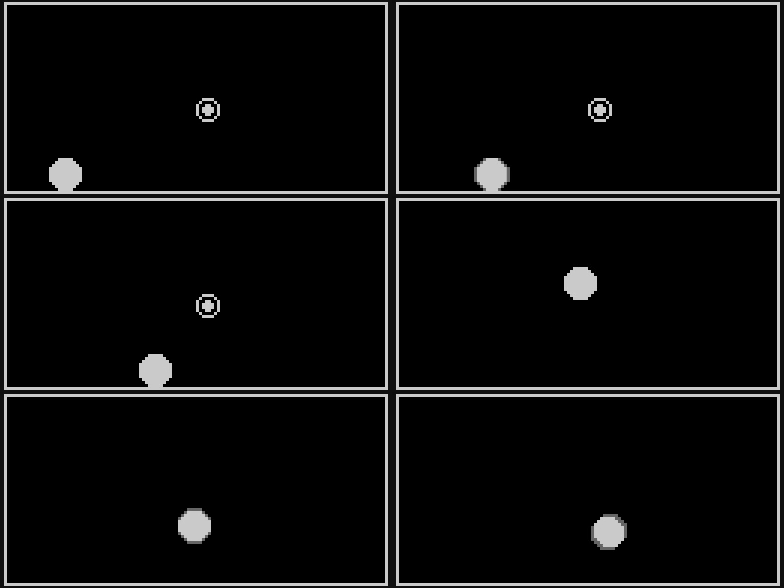
We now have a coin we can collect!
Colliding with a Platform Obstacle

Let’s make a second type of Obstacle! One we can actually collide with: a platform.
Let’s add another new variable to our Obstacle struct that lets us specify an obstacleType:
- An integer called
**obstacleType**** **- so we can distinguish what type of Obstacle it is that we’re colliding with. Is it a collectible, or is it a platform?
struct Obstacle {
	int x;
	int y;
	int width;
	int height;
	int obstacleType; // let's say 0 means it's a platform and 1 means it's a collectable
  bool gone;
};
Then we’ll also need code to keep the player from going into the Obstacle. Let’s change several things:
-
Let’s change the
isCollidingmethod to take oneObstacleand oneEntityvariable as its arguments -
Let’s add code for keeping the player outside the obstacle if the obstacle is of
obstacleType0 (we arbitrarily decided that type “0” would mean “Platform”).
#include <Arduino.h>
#include <Arduboy2.h>
#include "entity.h"

Arduboy2 arduboy;

// Define our Obstacle struct
struct Obstacle {
	int x;
	int y;
	int width;
	int height;
  int obstacleType;
  bool gone;
};

// Player data
Entity player = {20.0, 40.0, 10, 10};
float speed = 60.0;

// World data
float gravity = 240.0;
Obstacle coinObstacle = {64, 32, 8, 8, 1}; // Create a variable of type Obstacle and fill in the given numbers (x, y, width, height, obstacleType)
Obstacle platformObstacle = {70, 52, 24, 12, 0};

// Coin Image
const uint8_t PROGMEM CoinPowerup[] = {
8, 8,
0x3c, 0x42, 0x99, 0xbd, 0xbd, 0x99, 0x42, 0x3c,
0x00, 0x3c, 0x42, 0x99, 0x99, 0x42, 0x3c, 0x00,
0x00, 0x00, 0x7e, 0xff, 0x81, 0x7e, 0x00, 0x00,
0x00, 0x00, 0x00, 0xff, 0xff, 0x00, 0x00, 0x00,
0x00, 0x00, 0x7e, 0x81, 0xff, 0x7e, 0x00, 0x00,
0x00, 0x3c, 0x42, 0x99, 0x99, 0x42, 0x3c, 0x00,
};

void setup() {
	arduboy.begin();
}

bool isColliding(const Obstacle& obstacle, Entity& player) {
    // Calculate the bounding box for the player
    int playerLeft = player.x - player.width * 0.5;
    int playerRight = player.x + player.width * 0.5;
    int playerTop = player.y - player.height * 0.5;
    int playerBottom = player.y + player.height * 0.5;

    // Calculate the bounding box for the obstacle
    int obstacleLeft = obstacle.x;
    int obstacleRight = obstacle.x + obstacle.width;
    int obstacleTop = obstacle.y;
    int obstacleBottom = obstacle.y + obstacle.height;

    // Check for collision
    if (playerRight < obstacleLeft || playerLeft > obstacleRight || playerBottom < obstacleTop || playerTop > obstacleBottom) {
        // No collision
        return false;
    } else {
        // Collision detected
        if(obstacle.obstacleType == 0) { // obstacleType 0 is not allowed to intersect, so push it out
          if (playerRight > obstacleLeft && player.x < obstacleLeft && player.y > obstacleTop && player.y < obstacleBottom) {
              player.x = obstacleLeft - player.width * 0.5;
              player.xMomentum *= -0.25;
          } else if (playerLeft < obstacleRight && player.x > obstacleRight && player.y > obstacleTop && player.y < obstacleBottom) {
              player.x = obstacleRight + player.width * 0.5;
              player.xMomentum *= -0.25;
          }

          if (playerBottom > obstacleTop && player.y < obstacleTop) {
              player.y = obstacleTop - player.height * 0.5;
              player.yMomentum = 0;
          } else if (playerTop < obstacleBottom && player.y > obstacleBottom) {
              player.y = obstacleBottom + player.height * 0.5;
              player.yMomentum = 0;
          }
        }

        return true;
    }
}

long lastFrameMs = 0;
float deltaTime;

void loop() {
	if (!(arduboy.nextFrame()))	return;
	arduboy.clear();

  // calculate the time since the last frame
  long ms = millis() - lastFrameMs; // in ms
  deltaTime = ms * 0.001; // convert to seconds
  lastFrameMs = millis(); // remember the current ms for use during the next frame

  arduboy.pollButtons();

  arduboy.drawRect(0, 0, arduboy.width(), arduboy.height(), WHITE);

  // Left / Right momentum
	if(arduboy.pressed(LEFT_BUTTON)) {
		player.xMomentum = -speed;
	} else if(arduboy.pressed(RIGHT_BUTTON)) {
		player.xMomentum = speed;
	} else { // Slow down if no input
		player.xMomentum = player.xMomentum * pow(0.05, deltaTime);
	}

  // Jump
	if(arduboy.justPressed(A_BUTTON)) {
		player.yMomentum = -speed * 2.0;
	}

  // Add Gravitational force
	if(player.yMomentum < 100.0) player.yMomentum += gravity * deltaTime;

  // Update the position based on momentum
	player.x += player.xMomentum * deltaTime;
	player.y += player.yMomentum * deltaTime;

	// Check if the circle is out of bounds
	// Left Edge
  if(player.x < 0 + player.width * 0.5) {
		player.x = player.width * 0.5;
	}
  // Right Edge
	if(player.x > arduboy.width() - player.width * 0.5) {
		player.x = arduboy.width() - player.width * 0.5;
	}
  // Top Edge
	if(player.y < 0 + player.height * 0.5) {
		player.y = 0 + player.height * 0.5;
	}
  // Bottom Edge
	if(player.y > arduboy.height() - player.height * 0.5 - 2) {
		player.y = arduboy.height() - player.height * 0.5 - 2;
    player.yMomentum = 0.0;
	}

	// Draw a circle at the current position
	arduboy.fillCircle(player.x, player.y, player.width * 0.5, WHITE);

  // COIN
  // Draw the coin (only if it's not gone)
	if( coinObstacle.gone == false ) Sprites::drawSelfMasked(coinObstacle.x, coinObstacle.y, CoinPowerup, 0);

  // check for collision (only if it's not already gone)
  if( coinObstacle.gone == false && isColliding(coinObstacle, player) ) {
	  // COLLISION!
    if(coinObstacle.obstacleType == 1) { // let's say obstacleType 1 is collectable
      coinObstacle.gone = true; // make it gone
    }
  }

  // PLATFORM
  // Draw the platform
  arduboy.fillRect(platformObstacle.x, platformObstacle.y, platformObstacle.width, platformObstacle.height, WHITE);

  // handle platformObstacle collision
  isColliding(platformObstacle, player);


	arduboy.display();
}
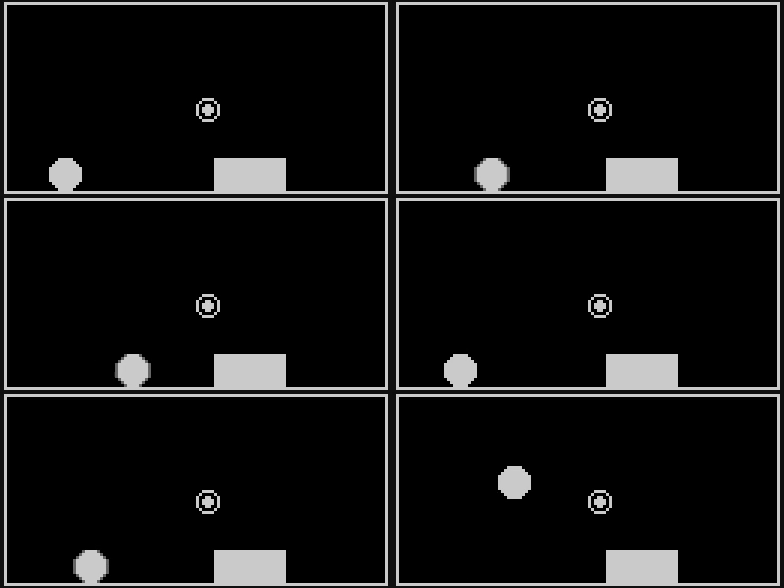
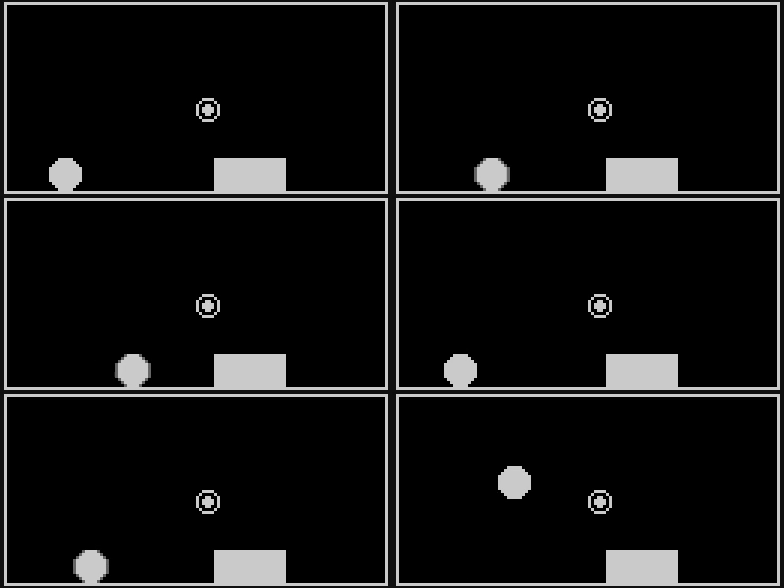
It works! We can move our sphere around, collect the coin and jump on top of the platform! BUT you can see how the code is turning into a somewhat unwieldy wall of code. So our next job will be to deal with that and make everything more reusable in the process.
Next Chapter: Part V: Level
Leave a comment